
Robotics and Autonomous Systems
MATLAB and Simulink for Robotics and Autonomous Systems
Develop autonomous applications from perception to motion and optimize system-level behavior
Robotics researchers and engineers use MATLAB and Simulink to design, simulate, and verify every aspect of autonomous systems, from perception to motion.
Model robotic systems down to the finest details such as sensor noise and motor vibration.
Simulate robotic systems with accurate kinematics, dynamics, and contact properties.
Design and optimize both high-level autonomy and low-level control.
Synthesize and analyze sensor data with a maintained library of algorithms.
Verify robot design or algorithm gradually, from simulation to hardware-in-the-loop (HIL) test.
Deploy algorithms to robots via ROS or directly to microcontrollers, FPGAs, PLCs, and GPUs.
“Model-Based Design and automatic code generation enable us to cope with the complexity of Agile Justin’s 53 degrees of freedom. Without Model-Based Design it would have been impossible to build the controllers for such a complex robotic system with hard real-time performance.”
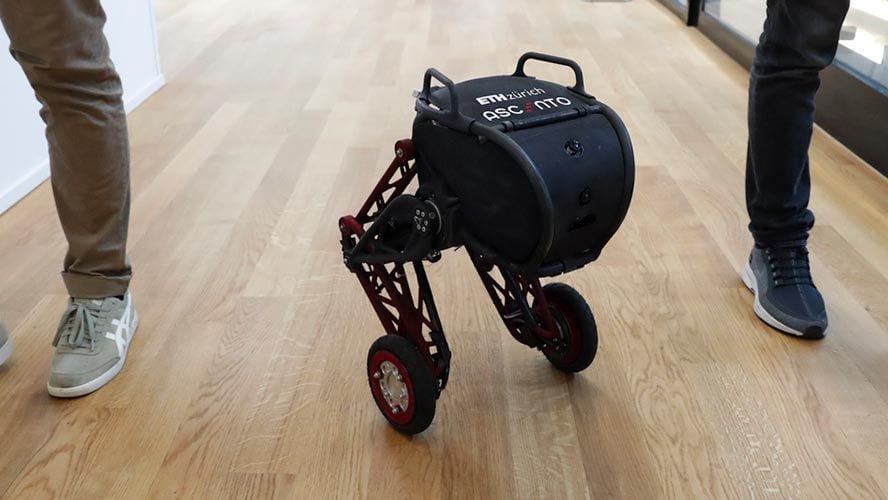
Students Build Innovative Jumping Robot in One School Year
Preceyes Accelerates Development of World’s First Eye-Surgery Robot Using Model-Based Design
Airnamics Develops Unmanned Aerial System for Close-Range Filming with Model-Based Design
Design the Hardware Platform
Create a 3D physical model or an electromechanical model of autonomous vehicles, drones, and manipulators for simulation, optimization, and reinforcement learning of control algorithms.
Import existing 3D models from URDF files or CAD software.
Make the model physically accurate by implementing dynamics, contacts, hydraulics, and pneumatics.
Complete the digital twins by adding an electrical diagram layer.
Modeling and Simulation of Walking Robots (21:18)
Simulating Robot Throwing Mechanisms (10:50)
Vehicle Modeling Using Simscape Multibody (22:42)
Interact with Rigid Body Tree
Implement sensor data processing algorithms with powerful toolboxes in MATLAB and Simulink.
Connect to sensors through ROS, Serial, and other types of protocols.
Visualize data from cameras, sonar, LiDAR, GPS, and IMUs. Automate common sensor processing tasks such as sensor fusion, filtering, geometric transformation, segmentation, and registration.
Fusing a Mag, Accel, and Gyro to Estimate Orientation | Understanding Sensor Fusion and Tracking, Part 2 (16:00)
Embedded Vision Using MATLAB and Simulink (2:43)
Getting Started with Lidar Acquisition in MATLAB (6:31)
IMU and GPS Sensor Fusion
From Quaternion to Orientation
Sensor Fusion and Tracking Toolbox
Perceiving the Environment
Use built-in interactive MATLAB apps to implement algorithms for object detection and tracking, localization and mapping.
Experiment and evaluate different neural networks for image classification, regression, and feature detection.
Automatically convert algorithms into C/C++, fixed-point, HDL, or CUDA® code for deployment to hardware.
Semantic Segmentation Using Deep Learning
Detect, Pick, and Place in Gazebo Simulation
Robotics, Vision, and Control: Fundamental Algorithms in MATLAB, 3e
Planning and Decision Making
Use an actively maintained algorithm library to implement 2D or 3D path planning for a robot that is either defined as a point mass or a system with kinematic and dynamic constraints. Perform task planning with Stateflow®, defining the conditions and actions needed for decision making in real time.
Trajectory Planning for Robot Manipulators (18:21)
Motion Planning Hands-on Using RRT Algorithm (3 Videos)
Robot Motion Planning Given Kinematic Constraints
Obstacle Avoidance by Reinforcement Learning
Motion Planning with MATLAB
Reinforcement Learning Toolbox
Designing Control Systems
Use built-in interactive MATLAB apps to analyze the behavior of complex systems in time and frequency domains. Design feedback controllers in the deterministic approach, optimization approach, or reinforcement learning approach.
Safe Robot Manipulator Control Using Simulink (2:58)
Model-Based Control of Humanoid Walking (19:38)
Why Use MPC? | Understanding Model Predictive Control, Part 1 (4:50)
MATLAB and Simulink for Control System
Robot Arm Impedance Control
Model Predictive Control for Drones
Model Predictive Control for Avoiding Dynamic Obstacles
Model Predictive Control Toolbox
Communicating with Platforms and Targets
Deploy autonomous algorithms to ROS-based systems and microcontrollers such as Arduino® and Raspberry Pi™. Communicate with embedded targets via protocols, including CAN, EtherCAT®, 802.11™, TCP/IP, UDP, I2C, SPI, MODBUS®, and Bluetooth®.
Mapping Your Surroundings Using MATLAB and Arduino (2:50)
Lane-Following Robot Using MATLAB, Raspberry Pi, and Arduino (1:45)
Deploying ROS Node on Raspberry Pi (9:18)
Hardware Interface Supports
Simulink, ROS, and Raspberry Pi
“With MATLAB and Simulink we can use a single environment for control algorithm development, debugging, data analysis, and more—instead of switching between multiple tools. That integration reduces overall project development time and the chances of introducing errors.”
Related Applications and Topics
Free Offroad Vehicles Tutorial
Learn how to create virtual testbenches for developing and validating control and autonomy of heavy machinery.
Let us know how we can help you.
Get MATLAB, Simulink, and more.
Choose a web site to get translated content where available and see local events and offers. Based on your location, we recommend that you select: .
You can also select a web site from the following list
How to Get Best Site Performance
Select the China site (in Chinese or English) for best site performance. Other MathWorks country sites are not optimized for visits from your location.
Switzerland Deutsch English Français
Contact your local office
官网:https://www.mathworks.com/solutions/robotics.html
资料来源:企业官网公司简介(复核日期:2026-10-07)。